Instructions for the electronic stopwatches with lap memory used in the IZhO 2026 experimental competition (IZhO 2026 · Problema 1). This is not a problem: the sheet only describes the equipment.
Stopwatch model FS-810
ENGLISH LANGUAGE
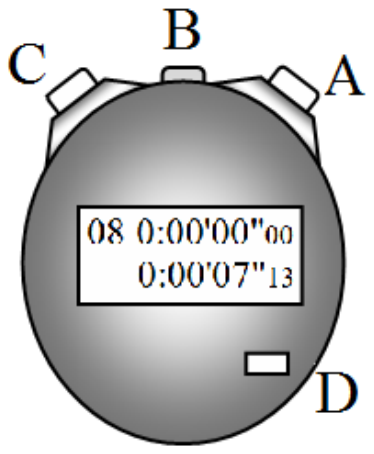
Button A — start/stop. Button B — Split/Lap memory (stage memory). Button C — Record splits / Reset. Button D — Mode (do not use).
Recording split (stage) times
- At the start, press Button A (time = 0).
- At the end of Stage 1, press Button C (the stopwatch memory stores the time for Stage 1). At the end of Stage 2, press Button C again (the memory stores the cumulative time for Stages 1–2), and so on.
- After completing 10 stages, press Button A (stop the stopwatch).
Reading split (stage) times
- Press Button B (switch to split-time reading mode).
- Press Button C (the display will show the cumulative time for the stages).
- By pressing Button C repeatedly, you can read the cumulative times from Stage 1 to Stage 10. (In the figure: Stage 8 and the cumulative time for 8 stages is 7.13 s.)
- To return to split-time recording mode, press Button B.
- To clear the split memory, press Button C.
If necessary, you can repeat the split recording and reading process.
Stopwatch model FS-830
ENGLISH LANGUAGE
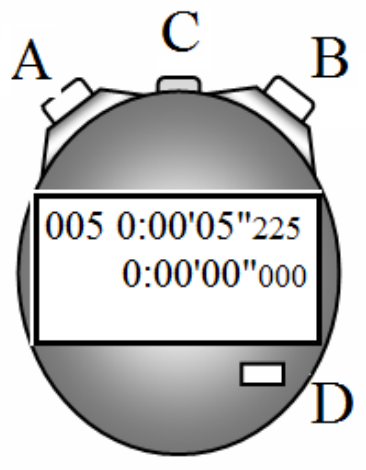
Button B — start/stop. Button C — Split/Lap memory (stage memory). Button A — Record splits / Reset. Button D — Mode (do not use).
Recording split (stage) times
- At the start, press Button B (time = 0).
- At the end of Stage 1, press Button A (the stopwatch memory stores the time for Stage 1). At the end of Stage 2, press Button A again (the memory stores the cumulative time for Stages 1–2), and so on.
- After completing 10 stages, press Button B (stop the stopwatch).
Reading split (stage) times
- Press Button C (switch to split-time reading mode).
- Press Button C (the display will show the cumulative time for the stages).
- By pressing Button C repeatedly, you can read the cumulative times from Stage 1 to Stage 10. (In the figure: Stage 5 and the cumulative time for 5 stages is 2.225 s.)
- To return to split-time recording mode, press Button C until the 3 lines of digits appear.
- To clear the split memory, press Button A.
If necessary, you can repeat the split recording and reading process.
Istruzioni dei cronometri elettronici con memoria dei giri (lap) usati nella prova sperimentale IZhO 2026 (IZhO 2026 · Problema 1). Non è un problema: il foglio descrive solo l’attrezzatura.
Cronometro modello FS-810
Pulsante A — avvio/arresto. Pulsante B — memoria Split/Lap (memoria delle tappe). Pulsante C — registrazione degli split / azzeramento. Pulsante D — Mode (non usare).
Registrazione dei tempi di tappa (split)
- Alla partenza premere il pulsante A (tempo = 0).
- Alla fine della tappa 1 premere il pulsante C (la memoria del cronometro registra il tempo della tappa 1). Alla fine della tappa 2 premere di nuovo il pulsante C (la memoria registra il tempo cumulativo delle tappe 1–2), e così via.
- Completate 10 tappe, premere il pulsante A (arresto del cronometro).
Lettura dei tempi di tappa (split)
- Premere il pulsante B (passaggio alla modalità di lettura degli split).
- Premere il pulsante C (il display mostra il tempo cumulativo delle tappe).
- Premendo ripetutamente il pulsante C si leggono i tempi cumulativi dalla tappa 1 alla tappa 10. (Nella figura: tappa 8, tempo cumulativo delle 8 tappe 7,13 s.)
- Per tornare alla modalità di registrazione degli split, premere il pulsante B.
- Per cancellare la memoria degli split, premere il pulsante C.
Se necessario, si può ripetere la registrazione e la lettura degli split.
Cronometro modello FS-830
Pulsante B — avvio/arresto. Pulsante C — memoria Split/Lap (memoria delle tappe). Pulsante A — registrazione degli split / azzeramento. Pulsante D — Mode (non usare).
Registrazione dei tempi di tappa (split)
- Alla partenza premere il pulsante B (tempo = 0).
- Alla fine della tappa 1 premere il pulsante A (la memoria del cronometro registra il tempo della tappa 1). Alla fine della tappa 2 premere di nuovo il pulsante A (la memoria registra il tempo cumulativo delle tappe 1–2), e così via.
- Completate 10 tappe, premere il pulsante B (arresto del cronometro).
Lettura dei tempi di tappa (split)
- Premere il pulsante C (passaggio alla modalità di lettura degli split).
- Premere il pulsante C (il display mostra il tempo cumulativo delle tappe).
- Premendo ripetutamente il pulsante C si leggono i tempi cumulativi dalla tappa 1 alla tappa 10. (Nella figura: tappa 5, tempo cumulativo delle 5 tappe 2,225 s.)
- Per tornare alla modalità di registrazione degli split, premere il pulsante C finché compaiono le 3 righe di cifre.
- Per cancellare la memoria degli split, premere il pulsante A.
Se necessario, si può ripetere la registrazione e la lettura degli split.